Tooling
Linter
Bascik provides official linter and editor tooling to catch invalid markup, unclosed components, undeclared props, misplaced script directives, and CSS/JS scoping errors as you type or in CI.
Editor support and CLI diagnostics are powered by @bascik/language-server.
Linter, or bascik --check?
Both, and they do different jobs. Each rule lives in exactly one of them.
Linter (@bascik/language-server) | bascik --check | |
|---|---|---|
| Answers | Questions about one file: is this attribute a typo, can this CSS be scoped, does this API route export a handler | Questions about the whole project: duplicate routes, unused components, config errors, unmatched tags |
| Runs | In your editor as you type, and from the command line | From the command line and CI |
| Needs | Nothing but the file (and the project's config, to find components) | The whole project |
bascik --check also runs the linter. When @bascik/language-server is installed, bascik --check hands it your pages, components, and API routes and lists what it finds, so one command covers both halves and an editor squiggle always matches what CI reports. The full list of which rule lives where is in Diagnostics.
Use the linter on its own, without bascik, when you want per-file checks and nothing else: a shared component library with no site of its own, a pre-commit hook that must stay fast, or an editor other than VS Code.
Features at a Glance
- Component Autocompletion: Auto-completes custom tags (
<my-counter />,<site-nav>), automatically inserting self-closing tags for void components or slot blocks for components with slots. - Prop & Slot Completion: Suggests declared and inferred props (
data-bascik-prop-*) with descriptions and validates named slots (data-bascik-slot). - Script Directive Completion: Contextually completes
data-bascik-build,data-bascik-build-once,data-bascik-routes,data-bascik-server, anddata-bascik-streamon<script>tags, enforcing mutual exclusion so you cannot accidentally combine conflicting script runtimes. Puttingdata-bascik-buildanddata-bascik-build-onceon one tag is an error too: choose one build-script mode. - Hover Documentation: Hovering over any custom component renders its
<!-- @bascik -->docblock, author description, declared props, and available slot names. - Jump to Definition: Jump directly from a custom tag to its HTML source file, or from a script import specifier (
@/...,./...) to the target file. - Find All References: List every page and component that uses a component, from one of its tags or from the component's own file. See Find All References.
- Linter Diagnostics: Instant feedback for unclosed components, paired closing tags on zero-slot components, and unscoped runtime DOM or CSS manipulations.
CLI Linter
Every project scaffolded with npm create bascik includes a lint script in package.json. It runs bascik --check, which hands your files to the linter and adds the project-wide checks:
npm run lintEach finding gives the file, line and column, a rule name, and a suggested fix. This is a real run against a project with four problems planted in it:

To run only the linter, without the project-wide checks, call the language server directly on any directory or file with npx:
npx @bascik/language-server --checkCheck a specific path or page:
npx @bascik/language-server --check src/pagesName several paths to check them in one run. The project is found from the first one, and an option the checker does not know, such as a misspelled --fixx, stops it with a usage error instead of being ignored:
npx @bascik/language-server --check src/components src/pagesThe checker reads bascik.config.ts to know which folders hold components. A component folder outside the project, such as a monorepo's shared components, is not under the directory you check, so check it separately. Run from the site, the checker uses the site's config for any folder listed in its directory.components; --project names the project explicitly from anywhere:
cd sites/marketing
npx @bascik/language-server --check ../../shared/components
npx @bascik/language-server --check ../../shared/components --project .
TypeScript Errors with --typescript
Pass --typescript to also report TypeScript errors in <script type="text/typescript"> blocks, checked the same way as in the VS Code extension:
npx @bascik/language-server --check --typescriptEach error is reported at its line and column with TypeScript's number as the rule, such as (TS2322), and fails the run like any other error. The check uses the project's own typescript package, or, when the project cannot resolve one, a typescript the @bascik/language-server package can resolve from where it is installed (a pnpm strict layout or a global install, for example). It must be TypeScript 5 or 6 (npm install --save-dev typescript@6); TypeScript 7 publishes no language service and TypeScript 4 cannot resolve .ts imports as Bascik does, so both are skipped. Without a usable TypeScript the run prints one note: line saying why and checks everything else. TypeScript errors are opt-in so that adding the language server to an existing project's CI never fails it on errors its build ignores.
Auto-fixing with --fix
Add --fix to apply the fixes that have exactly one correct answer, write them to disk, and report what remains:
npx @bascik/language-server --check --fixTwo rules are fixable:
missing-prop-prefix:<my-card title="Hello">becomes<my-card data-bascik-prop-title="Hello">whentitleis a declared prop ofmy-card.prefer-self-closing-component:<zero-slot-comp></zero-slot-comp>becomes<zero-slot-comp />when the component has no slots.
In VS Code, the same two fixes appear as Quick Fixes (Cmd+. or Ctrl+.) on the warning. bascik --check --fix applies exactly the same fixes, by calling this tool, so either command works in a pre-commit hook. The editor also offers Wrap template in html`...` for server-script-unescaped-markup, which --fix never applies (see below).
server-script-unescaped-markup
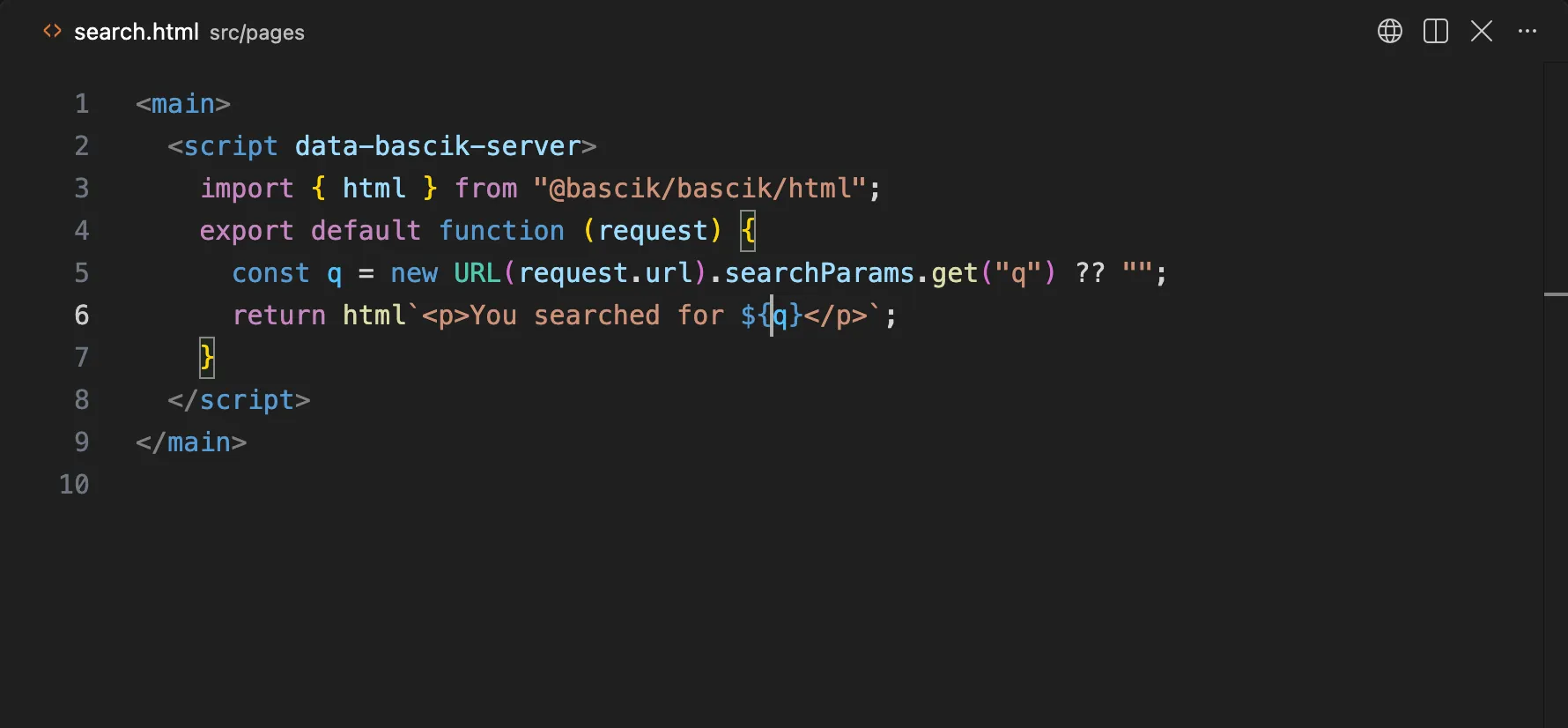
In any directive script (data-bascik-server, data-bascik-stream, data-bascik-build, data-bascik-build-once or data-bascik-routes), and in the .ts and .js modules those scripts run in Node, a template literal that looks like markup (it holds a tag) and interpolates a value without html is a warning on that hole:
src/pages/search.html:14:31 - warning: (server-script-unescaped-markup) This markup template (line 14) interpolates ${q} (hole 1) without html. Wrap the template in html`...` from @bascik/bascik/html, which escapes each value for where it lands.A module runs in Node when it is a directive script's src= file, an API route, or a module one of those imports with a ./, ../ or @/ specifier (and so on, transitively). That covers a build script's helpers in src/lib/, also under a component root or a scripts.importRoot outside the project, such as a monorepo's shared folder. A component's plain <script src> file runs in the browser, so it and the modules only it imports keep the scoping rules instead; a module that both import gets both. A script that exec runs, and a module nothing above imports, is not checked. bascik --check checks these modules with the pages that import them and reports each finding with its file and line:
src/lib/posts.ts:6:7 - warning: (server-script-unescaped-markup) This markup template (line 5) interpolates ${post.title} (hole 1) without html. It reads post, a parameter of postCard(), which other modules can call: the value may be markup from a caller, which html would escape, so the page would show its tags as text. Build the callers' markup with html`...` (raw() for fixed markup) and pass html values, since html inserts an html value as it is, then wrap this template in html`...` from @bascik/bascik/html.Every markup template in such a module counts, not only one that is returned. Messages are skipped: the arguments of console.*(), new Error(), throw and super() in a class that extends an Error, and the value of a message, error, reason or warning property. So are search patterns, which match rendered HTML rather than write it: the argument of .includes(), .indexOf(), .lastIndexOf(), .startsWith(), .endsWith(), .split(), .search(), .match() or .matchAll(), the first argument of .replace() or .replaceAll() (the replacement is output and still counts), and the source of RegExp(). A template that starts like a lint or compiler message (`${file}:${line}: <img src="${src}"> needs alt text`) is a message too, and in build-time code so is a template passed straight to a function whose name has a reporting word in it, split at camelCase: finding(), addWarning(), ctx.report(), logger.warn() (report, warn, warning, error, finding, issue, problem, diagnostic, message, notice, info, log, lint, fail and their plurals), unless the template starts with a tag and holds an end tag: writeReport("report.html", `<html>...</html>`) saves a page. out.push() and dialog() are no reporting functions, and request-time code still reports markup passed to one, since it may write the page. Build-time code also holds CLI text (<path> --out <output>), messages that name elements (<img> needs alt text, Found <p> inside <button>), Markdown code spans and fenced blocks, SQL (a<b) and generated TypeScript (Array<Path>), so there a template counts as markup only when it holds an end tag (</li>), a start tag with an attribute (<book-card title="...">, <details open>), or a bare <li>, <p>, <div>, <td> or similar tag that is no placeholder word and starts the template, follows a hole or follows another tag. Tag names start lower case, and a tag right after a backtick is in a code span, whether its name is fixed or a hole (\`<${tag} class="${attr}">\`). A Markdown fenced block, from a line that starts with three backticks (written \`\`\` in a template) or ~~~ through the line that closes it, is text the Markdown renderer escapes: its holes are not reported (a fence that never closes opens no block, so the markup after it still counts), and a template that holds one gets no quick fix, since html would escape the fence's code too. A tag whose name is a hole counts in all code when an attribute follows it (<${tag} class="...">) or the template also closes it (<${tag}>...</${tag}>); a lone <${tag}> needs a src attribute is a message.
A template that starts with <?xml, or whose first tag is urlset, url, sitemapindex, sitemap, loc, rss, feed, channel, item or entry, is XML, and so is a template nested in an XML template's holes: its holes are told to use esc(), whose entities XML reads too, or an XML escaper with a comment, and get no quick fix, since html builds HTML. A hole that holds XML built already, a .join(...) (${items.map((i) => `<item>...</item>`).join("\n")}), a nested template or a name bound to one, is not reported: its own templates are checked, and escaping it again would show its tags as text.
A value is fine without html when it is:
- a string, number, boolean or
nullliteral; - a number:
x.length,price.toFixed(2), a wholeNumber(q),parseInt(q, 10)orMath.round(q)call, or arithmetic with-,*,/,%or a unary sign (a * 2 - b,-x); - a
+whose operands are all fine (count + 1,items.length + 1,"Hi " + esc(q)), or a loop counter plus a number (i + 1) when the name is not bound to a value that is not fine; - an
ALL_CAPSconstant; - a nested
htmlvalue, such asitems.map((i) => html`...`); - a call to
html,raw,esc,safeUrl, orjsonas imported from@bascik/bascik/html(aliases and namespace imports count), or to a function listed indiagnostics.escapeFunctions; - a conditional (
?:,||,??,&&) whose rendered operands are fine, or a name bound to one of these.
These are reported, because + joins strings and a joined string can carry a visitor's markup:
${first + last}and${name + ": $" + price.toFixed(2)}:toFixed()makes only its own operand a number;${q + 1}whenqholds request data, and${Number(x) || name}, wherenamecan render;- a
letorvarname reassigned after its declaration: every latername = ...,name += ...,name ||= ...orname ??= ...counts, and so does a destructuring assignment ([name] = [v],({ name } = o)), solet label = "everyone"; if (q) label = q;is reported where${label}lands. Aconstis checked by its one value.
Templates tagged with String.raw, dedent, outdent, stripIndent, stripIndents, oneLine, oneLineTrim or codeBlock join their values as they are, so they are checked like templates without a tag (with no quick fix, since the fix would replace a tag). Other tagged templates (sql`...`, css`...`, a project's own tag) are skipped, because a tag may escape its values. Templates that hold no tag (URLs, SQL, JSON, plain text), and the arguments of console.*(), new Error() and throw, are skipped, and so are the sink rules on them: WHERE id = ${id} in a SQL template is not an unquoted attribute. A hole where html would throw (an onclick value, a <script> body, a style, an unquoted attribute) keeps its own sink warning instead.
The quick fix Wrap template in html`...` puts html before the backtick and adds import { html } from "@bascik/bascik/html"; after the script's last import, or merges html into an existing import from that module. When the name html already means something else in the script's code (a variable, a parameter such as (title, html) => ..., a function, another import), it imports html as safeHtml instead, merged into an existing import from the module when there is one, and tags with safeHtml. Words in strings, comments and markup (<html>) and members such as page.html do not count. When safeHtml is taken too, the fix is not offered, so it never writes code that means something else.
The fix is also not offered when a hole of the template sits where html would throw, because the fixed page would fail on every request: a tag name (<h${level}>), where an attribute name goes (<p ${attrs}>), an unquoted value, inside an HTML comment or a <!...> declaration, inside a <script> or <style>, in an on*, style or srcdoc value, in a <meta> http-equiv or content value, or in an attribute of an SVG <animate>, <set>, <animateMotion>, <animateTransform> or <animateColor>. The same goes for a URL attribute (href, src, action, srcset, ping and the like) that breaks html's scheme rule: a value whose first hole starts the URL and is followed by another hole, or by text with a : or & before the first /, ? or # (href="${base}${path}", href="${protocol}://${host}/", href="${host}:${port}/"), and a value whose text before the first hole could run into a scheme (href="java${x}") or is a script scheme (javascript:, or data: outside an image). Those holes get esc() advice; with one hole for the whole URL (href="${url}"), or a / first (href="${base}/about/"), the fix is offered. A template that ends inside a tag, comment or quoted value gets no fix either. Nor is it offered unless every hole is plain data: when a hole may hold markup built as a string, or a value escaped already, wrapping would escape it, and the page would show its tags or &lt; as text. The warning stays and says which hole withholds the fix:
- A hand-written escaper. A hole such as
${escape(q)}or${escapeHtml(q)}, a call to a function named like an escaper that is not trusted, gets a longer message:escape() looks like a hand-written escaper, and html escapes too, so wrapping this template in html would show &lt; on the page.Wrap the template inhtmlyourself and pass the value as it is (${q}), or list the function indiagnostics.escapeFunctionsif it is a trusted escaper. - A joined string. A hole that is a
.join(...)call, or a name bound to one, holds markup already; wrapping the outer template would escape it. The message says so: wrap the inner templates inhtml, drop.join(""), and pass the array. - A project helper. A hole that calls a function imported from a
./,../or@/module (${productCard(p)},${items.map(productCard)}), or a name bound to its result, may hold the markup string the helper returns, whichhtmlwould escape. Build the helper's markup withhtmlfirst;htmlinserts anhtmlvalue as it is. A hole that reads a name imported from such a module without calling it (${ICON_OK},${icons.ok},${footer}) withholds the fix too, since it may be a markup string; anALL_CAPSconstant is fine on its own and is not reported, but it still withholds the fix from the template around it. Names imported from packages withhold it as well (see the allowlist below);import typenames bind no value. - A local helper. The same goes for a function defined in the same script or module (a TypeScript annotation such as
const bold: (t: string) => string = ...is skipped) whose code builds markup as a string: an untagged markup template (const item = (t) => `<li>${esc(t)}</li>`), a quoted string with a tag ("<b>" + t + "</b>",s === "ok" ? '<svg class="ok"></svg>' : "<span>-</span>"), a call to a project helper, or a name or function that does (function getIcon() { return ICON; }withconst ICON = '<svg>...</svg>'). A local function that builds its markup withhtmldoes not withhold it on these grounds; whether any local function keeps the fix is up to the allowlist below. - A name that holds markup. A hole that reads a name whose value is built from markup strings in the same file withholds the fix: an accumulator (
let out = ""; for (...) out += `<li>${t}</li>`), an array of templates interpolated without.join(const parts = items.map((i) => `<li>${i}</li>`), whichhtmlwould escape item by item), or an array filled with.push(). Aconst,letorvarwith a type annotation (const ICONS: Record<string, string> = {...},let out: string = "") counts like one without, and so does each name of a destructuring (const { icon } = ...), which holds markup when the value it is taken from does. A function's parameter holds what the calls in the same file pass it, so infunction layout(title, body) { return `<main>${body}</main>`; }called aslayout("Home", "<p>Welcome</p>"),${body}withholds the fix. In a.tsor.jsmodule, a parameter whose callers the file cannot all see may hold a caller's markup: anything other modules can call (exported functions and default exports, the methods and constructors of exported classes, the methods of exported objects), every callback (items.map((item) => ...), a.replace()callback's captures), every method, and any function that is returned, stored or passed on rather than only called by name. So maythisfields,arguments, and afor...ofvariable over such a value. Their holes keep the warning and get no fix whatever the parameter's type, since a JavaScript caller can pass markup to a parameter typednumber: build the callers' markup withhtmland passhtmlvalues. A parameter of a local function the file only calls by name keeps the fix only when it is typednumber,bigintorboolean; any other type withholds it even when every call in the file passes plain data. Names are matched across the file, not by scope, so a name that holds markup anywhere withholds the fix wherever it is read: the fix is offered only when Bascik can tell the hole is plain data. A hole that builds markup itself (${"<b>" + t + "</b>"}, a nested untagged template) withholds it too. - A value the file cannot see into. A hole that calls a parameter (
${render()}, a callback), a function named for markup (marked(),md.render(),DOMPurify.sanitize(),hljs.highlight(),renderToString(): names with render, markdown, marked, markup, html, sanitize, highlight or svg in them), or reads a file or a response (fs.readFileSync(),readFile(),res.text()), or an environment variable named for markup (process.env.FOOTER_HTML: names with markup, html, svg, snippet, partial, fragment, banner, footer, header, template or embed in them), or reads a name bound to such a call, may hold markup, so it withholds the fix. Other environment variables (process.env.SITE_URL) are taken to hold text. Other package and global functions (slugify(t),format(d)) get the plainer message below. - A value escaped already. A hole that calls
esc()from@bascik/bascik/html, or a function listed indiagnostics.escapeFunctions, or reads a name bound only to such a call, returns an escaped string, whichhtmlwould escape again. Wrap the template yourself and pass the value as it is. - A markup string. A hole that reads a name set to a string with a tag in the same file (
const icon = '<svg>...</svg>', ashape: '<path d="..." />'property), even one that is fine on its own, withholds the fix from the whole template. Make that value anhtmlvalue first (raw()for fixed markup).
Past those checks, the fix is allowlist-based: it is offered only when every hole of the template is provably plain data. A hole is plain data when every value it reads is one of these, directly or through a local const, joined with + or a template, or passed through String(), Number(), parseInt(), encodeURIComponent() or a string method such as toFixed(), toUpperCase(), trim(), slice(), replace() or padStart(): a string, number, bigint or boolean literal with no & or < in its value, an escape counting as the character it writes (so "—", "\x3cb>" and "\u003c" are not plain, since html would show them as text); a const object or array of only such literals that the file reads by a literal key or index (labels.ok, sizes[0]) and never changes, exports or passes on; request data in request-time code (the request parameter, context.params, context.remoteIp, and a URL or URLSearchParams made from them, such as new URL(request.url)); a process.env value; a Date or Date.now() value; a Math result; a parameter typed number, bigint or boolean (or a union of those) of a local function that is not exported and is only ever called by name, never reassigned or cast with as, when every call in the file and its default value pass a number (a number literal or const, Math, Number(), parseInt(), Boolean(), a const table's number, a plain value's .length, or arithmetic of those); a call to such a local function that returns only plain data; and an html value (html`...`, raw(), safeUrl(), json()), which html inserts as it is. Every argument of a call in the hole must be plain data too (an options object of literals counts), optional calls (?.()) and calls on a date or on request data included, and a date's members other than its methods (.constructor) are not followed. An html value turned into text is not plain, since html would escape it: String(x), x.toString(), x + "", a template of it, or a local function that returns one joined to a string. Nor is a URL or URLSearchParams built from a literal or a const (new URLSearchParams("q=%3Cb%3E")), which decodes %3C and %26 into < and &. The built-ins count only while the file leaves them alone: a file that declares its own String, Math, Date, process or the like, assigns to one of them or a member (process.env.X = ..., Math.max = ...), hands one to other code (Object.assign(process.env, ...)), or writes through globalThis gets no fix for reads of it, and a file that reaches a prototype (String.prototype.trim = ..., __proto__) gets no fix at all. The same goes for request data and dates: request data the script changes (request.headers.set(), .append() or .delete(), a write to context.params or to a URL's searchParams) or hands to other code (the request, its headers, context.params, or a URL made from them, passed to a function) is not plain anywhere in the script, and neither is a date the script hands to other code (Object.assign(d, ...)). The fix is meant to be safe for code written to build pages; code that rewrites built-ins or globals (patching a prototype, even through a computed key, reaching process or the global object through Reflect.set() or Function("return this")(), or assigning to process.env as a for...of target) is out of scope. Rather than follow such code, Bascik offers no fix anywhere in a file that calls eval(), Function() or new Function(), Object.defineProperty(), Object.defineProperties(), Reflect.defineProperty(), Reflect.set() or Object.setPrototypeOf(), or that assigns through a prototype key written any way (X.prototype.y = ..., X[`prototype`].y = ...); the warnings stay the same. Anything else keeps the warning and withholds the fix, and the message names the value and says why (reads state.body, an object whose fields are written elsewhere in the file, so Bascik cannot prove it is plain text): an object field or array slot that code can write, a Map or Set read, a class field (static ones too), a this field, a closure's variable, a let or var, a catch binding, a loop variable (for await too), globalThis, a destructuring target, an imported value, a parameter of any other type, and any parameter of an exported function, a callback or a method. Names are matched across the file, not by scope, so one such declaration of a name withholds the fix wherever the name is read. If the value is text, wrap the template in html yourself; if it is markup, make it an html value first.
The fixed template renders the same text with one exception: html renders null, undefined and false as nothing, where a plain template writes null, undefined and false. A hole that can hold one of them (a boolean such as ${open} or ${stock > 0}, or an environment variable that may be unset) renders empty after the fix, so write the text yourself (${open ? "yes" : "no"}, ${String(stock > 0)}, ${process.env.REGION ?? ""}) where the word matters.
bascik --check --fix does not apply the quick fix: wrapping changes the template's value from a string to an html value, which can break code that calls .replace() or .length on it. The editor does not offer the fix where the template's value reaches a string type, since the fixed code would fail type checking: the return of a function annotated : string (or Promise<string>, or string | undefined), a const, let or class field annotated : string, an as string or satisfies string, or a local const that reaches one of those, followed through parentheses, ? :, ||, ??, && and await. The message names the type: change it to SafeHtml (import { html, type SafeHtml } from "@bascik/bascik/html"), which also lets a caller nest the value in another html template, then wrap the template yourself. A template joined to a string with +, passed to a call or nested in another template stays a string, so it keeps the fix. A value passed to a parameter typed string, or returned from a function with no annotation whose callers treat it as a string, is not followed, so run your type checker after applying the fix.
A hole where a tag or attribute name goes (<h${level}>, <meta ${attr}="...">) cannot be wrapped in html, which throws there. In build-time code those holes are the site's own and are not reported; in request-time code the message says to choose between fixed names (level === 1 ? "h1" : "h2"). The other holes of such a template are told to use esc().
Request-time code gets every sink rule: server and stream scripts, API routes, and every module they import. Build-time code is build and routes scripts and the modules only they import; its values are the site's own data, so the sink rules are narrower. An unquoted attribute or a <script> body still warns unless the value is fine, since a space or </script> in the data breaks the markup whoever wrote it. An on* or style value (style="--fill: ${pct}%"), a URL attribute and a request value in text are not reported, and get no fix. A module both import is request-time.
JSON.stringify(data).replace(/</g, "\\u003c") (or .replaceAll("<", "\\u003c"), alone or with more replace calls after it, or a name bound to it) in a <script type="application/ld+json"> or type="application/json" is not reported, in build-time or request-time code: with < written as \u003c the value can never close the script. In an html template, use json(value) there instead, in the hole or through a name bound only to it (const body = json(data), then ${body}); a let that is later set to anything else is still an error.
Inside html templates the sink rules become errors (html throws there, at build time too), and two more rules catch values that would show as escaped markup:
html-escaped-twice(info) reportsesc()insidehtml, in the hole or through a name bound only to it, which shows&lt;on the page.html-joined-string(warning) reports a.join(...)ofhtmlvalues, or a name bound to one, in a text hole:This hole joins its items into one string, which html escapes, so the page shows <li> as text.Pass the array without.join("").
To trust a project escaper, list it in diagnostics.escapeFunctions. To silence a rule, put // bascik-ignore server-script-unescaped-markup on the line above the template's first line; it covers every hole in that template, including holes on later lines of a multi-line template. bascik-disable and bascik-enable comments silence a range, and diagnostics.disabledRules turns a rule off for the project. See Security.
server-script-returns-response
A server or stream script's return value is spliced into the page as markup, so a script that returns a Response (the API-route habit) is refused when the page is requested: an error in dev and an empty slot with a warning in production (see Return Values). The linter warns where the default export returns new Response(...), Response.json(...), Response.redirect(...) or Response.error(...), including an arrow whose body is one:
src/pages/status.html:6:16 - warning: (server-script-returns-response) This data-bascik-server script returns a Response, which Bascik refuses when the page is requested: the script's return value is spliced into the page as markup. Return a string or an html`...` value from @bascik/bascik/html. A Response belongs in an API route (src/api/).Return the markup (a string or an html value), or move the code to an API route when the response itself is what you want. The words in strings and comments, a return inside a nested helper or callback, a Response that is built but not returned, data-bascik-build scripts and API routes are not reported. A default export wrapped in a call (export default withAuth(handler)) is not read.
hand-written-html-escaper
A function in a directive script or a module that runs in Node (see above), that turns & and < into & and <, is a warning on its name. html and esc from @bascik/bascik/html already do that job, and html also knows where each value lands:
src/lib/escape.ts:1:17 - warning: (hand-written-html-escaper) escapeHtml() is a hand-written HTML escaper: it turns & and < into entities. Build markup with html`...` from @bascik/bascik/html, which escapes each value for where it lands, or call esc() from the same module for a plain string. If it escapes XML on purpose, say so in a comment above it.It finds a .replace() or .replaceAll() chain, a .split("<").join("<") chain, a lookup object ({ "<": "<" }, reported on the object's name), a new Map([["<", "<"]]) table or a map an IIFE returns, a switch over characters, [char, entity] pairs, and a character loop that appends entities with +=, in a function declaration, a method, an arrow or function bound to a name, an object property, or an unnamed export default function (reported as the default export). Numeric entities (&, <) count like named ones, and so does an entity built from a character ("&#" + c.charCodeAt(0) + ";", `&#${c.charCodeAt(0)};`, "&" + { "&": "amp", "<": "lt" }[c] + ";"). An escaper must produce both & and <, so a URL helper that only writes & is not one. These are not reported:
- a decoder, which reads entities instead of writing them (
.replace(/</g, "<"),.replaceAll("<", "<"),{ "<": "<" }); - a constant or a comparison (
const prev = "<",s === "&"); - an object whose keys are words (
{ amp: "&", lt: "<" }), which lists entities by name rather than mapping characters; - an escaper with a comment that says it is for XML, inside it or on its own lines right above its declaration: the comment names XML, RSS, Atom, a sitemap or SVG, and names HTML only to say it is not the target (
html does not build XML,html`...` builds HTML, not XML).Escape for HTML (not XML)does not count, nor does a comment elsewhere (on another class member, after the escaper, at the end of the line before it).htmlbuilds HTML, so an RSS feed may keep its own escaper, and its calls count as escaped in that file's markup templates. One named for XML (escapeXml,svgEscape) with no such comment is still reported, with a message that asks for the comment; - test files (
*.test.ts,*.spec.ts).
The quick fix Make escapeHtml() call esc() from @bascik/bascik/html is offered when the escaper has one plain parameter and is one return (or an arrow's expression) of that parameter (or String(value), (value ?? "")) followed only by .replace() or .replaceAll() calls that write entities: the body becomes return esc(value); and esc is imported (as escapeValue when the escaper is itself esc). Callers keep working. An escaper that does more (turns newlines into <br>, trims, adds text) does not get it, since esc would drop that. Other escapers get Import html from @bascik/bascik/html to build markup safely, which only adds the import.
A template that calls the escaper is reported by server-script-unescaped-markup with the longer hand-written escaper message, so the two rules point at both ends: build the template with html and pass the value as it is.
shared-name-group
name ships as written (Component Best Practices), so a component that holds a whole name group makes one group of all its copies on a page. The linter warns on the name attribute in the component file when the component is used more than once on one page and holds:
- two or more radios with one
namethat are not inside a<form>of the component's own (and have noformattribute): the copies are one radio group, so choosing in one copy clears the others; - two or more
<details>with onename: the copies are one exclusive accordion; - a
<map name>: the page has one map name per copy, and everyusemapuses the first.
src/components/format-picker/format-picker.html:4:25 - warning: (shared-name-group) name="format" is on 2 radios with no <form> of their own, and <format-picker> is used 2 times on src/pages/index.html, so the copies act as one radio group on the page: choosing in one copy clears the others. Wrap the radios in the component's own <form>, or give each copy its own name through a prop: data-bascik-attr-name="group" in place of name here, and data-bascik-prop-group="..." with a different value on each <format-picker>.The two fixes: wrap the radios in the component's own <form>, or bind the name to a prop (data-bascik-attr-name="group" with no literal name, and a different data-bascik-prop-group on each usage). The rule stays quiet when the name is bound to a prop, when the radios are inside the component's own form, when the component is used once per page, for one radio or one <details> per component (a group built from many instances on purpose, such as an accordion with one item per component), and in a project that sets scoping.attributes.name: true. It counts usages on every page under src and the pages folder, through nested components and in unsaved editor text; pages built from Markdown or by a build script are not counted.
When the shared group is what you want, silence it on the line above the attribute, or around the markup:
<!-- bascik-ignore shared-name-group -->
<details name="faq">
  <summary>Shipping</summary>
  Two days.
</details>
<details name="faq">
  <summary>Returns</summary>
  Thirty days.
</details>
bascik-ignore covers its own line and the next, so for a group spread over many lines use <!-- bascik-disable shared-name-group --> and <!-- bascik-enable -->, or turn the rule off for the project with "disabledRules": ["shared-name-group"] in bascik.ext.json.
component-name-underscore
A component whose tag name holds an underscore gets a warning on its file. The tag is the file name up to its first dot, lowercased, so site-nav_x.html defines <site-nav_x>, while site-nav.my_v2.html defines <site-nav> and a folder name never counts:
src/components/site-nav_x.html:1:1 - warning: (component-name-underscore) Component "site-nav_x" has an underscore in its name. The name is legal, but underscores can make two components' generated id classes spell the same name: #btn in <site-nav_x> and #x_btn in <site-nav> both compile to the class b_id_site-nav_x_btn, which stops the build. Use hyphens (e.g. "site-nav-x").The name is legal HTML, so this is a warning, not an error. The build itself fails only when two components really do generate one class, with an error that names both rules and their lines; see The Naming Scheme. Rename the file with hyphens, or silence the rule for the project with "disabledRules": ["component-name-underscore"] under diagnostics in bascik.ext.json.
Hints: attr-prop-unsupplied and api-unguarded-json
Two rules are hints: advice that is easy to ignore and never fails a run.
attr-prop-unsuppliedmarks adata-bascik-attr-*binding in a component whose prop no usage supplies: no page, no other component, and no open editor buffer has a<my-card data-bascik-prop-href="...">fordata-bascik-attr-href="href". It cannot see usages written in Markdown or produced by a build script, which is why it is a hint.api-unguarded-jsonmarks arequest.json()(orreq.json()) call in an API route that is not inside atryblock, because a malformed body then throws and the route answers 500.
Silence either with its id, like any rule: <!-- bascik-ignore attr-prop-unsupplied --> or // bascik-ignore api-unguarded-json on the line above, or "disabledRules": ["attr-prop-unsupplied"] in bascik.ext.json.
CI / Pre-commit Integration
The CLI checker exits with code 0 when clean (or only warnings) and code 1 when errors are detected, making it drop-in ready for GitHub Actions or pre-commit git hooks. Hints are shown in the editor and by this command, and never fail anything:
- name: Lint Bascik components and scripts
  run: npx @bascik/language-server --check
Editor Setup
In every editor, the language server checks only folders that are Bascik projects: a folder with a bascik.config.*, a language server config at its root (bascik.ext.json, .bascikrc.json, bascik.ext.ts, or bascik.ext.js), or a package.json that lists @bascik/bascik or @bascik/language-server in any dependency field. A shared component library that uses the linter on its own, or a global install with no package.json entry, opts in with a bascik.ext.json. Any other folder, such as a React or Vue app with its own src/components, gets no diagnostics, while navigation, hover, and completion still work, and the server logs why once (in VS Code, to the Bascik output panel). --check does not apply this rule: it checks the files you name in any folder.
VS Code
Install the official Bascik extension from the VS Code Marketplace:
- Press
Ctrl+P(orCmd+Pon macOS). - Type:text
ext install bascik.bascik-vscode - Press Enter.
New projects scaffolded with create-bascik include .vscode/extensions.json, prompting VS Code to recommend installing the extension upon opening the folder.
Find All References
The server answers the standard textDocument/references request for components, so Shift+F12 in VS Code, vim.lsp.buf.references() in Neovim, and any other editor's Find All References list every page and component that uses one. A request resolves on a component tag name, opening or closing, or on the first line, the <!-- @bascik comment, or the root element's tag line of the component's own file. Each result is the tag name in an opening tag, pages first, then components. A tag in a comment, an attribute value, or a <script>, <style>, or <textarea> body is not counted, matching what the compiler expands.

Source files only. The server reads your project's HTML files, so a usage that only exists in the output of a build script, a Markdown file, or a server script is not listed.
Neovim (nvim-lspconfig)
Because Bascik implements the standard Language Server Protocol (LSP), you can use it in Neovim with nvim-lspconfig:
local lspconfig = require('lspconfig')
local configs = require('lspconfig.configs')

if not configs.bascik then
  configs.bascik = {
    default_config = {
      cmd = { 'npx', '@bascik/language-server', '--stdio' },
      filetypes = { 'html' },
      root_dir = lspconfig.util.root_pattern('bascik.config.ts', 'bascik.config.js', 'bascik.ext.json', '.git'),
      settings = {},
    },
  }
end

lspconfig.bascik.setup{}
TypeScript errors in type="text/typescript" blocks are on in every editor and use the project's own typescript (5 or 6), or, when the project cannot resolve one, a typescript the @bascik/language-server package can resolve from where it is installed. Inside those blocks the server also answers hover, Go to Definition, completion (members after ., and files in relative and @/ import paths), and signature help, for the page's own names and for what it imports, as the VS Code extension does. A client can pass options when it starts the server, as initializationOptions:
lspconfig.bascik.setup{
  init_options = {
    typescript = {
      enabled = true,
      -- An absolute path to a typescript package folder to use instead of the project's own.
      path = '/path/to/node_modules/typescript',
      -- How long TypeScript stays loaded once no open page has a TypeScript block.
      releaseDelayMs = 30000,
    },
  },
}
editorHasEmbeddedTypeScript = true is for an editor that already answers about a page's own names in these blocks, as VS Code's HTML support does: the server then answers only for other files, import paths and what reaches the page through an import, so nothing is listed twice. Leave it out in Neovim.
Suppressing Warnings
In-File Comments
To suppress a warning for a specific line:
<!-- bascik-ignore -->
<inherit-demo-card></inherit-demo-card>
In CSS or JavaScript:
/* bascik-ignore */
[data-state] {
  color: red;
}// bascik-ignore
element.id = "dynamic-id";You can also disable checks across an entire block:
<!-- bascik-disable -->
...
<!-- bascik-enable -->
Both bascik-ignore and bascik-disable accept a comma-separated list of rule ids, with or without spaces after the commas, to silence only those rules:
/* bascik-disable js-attribute-selector, js-document-class-query */Configuration File (bascik.ext.json)
To configure diagnostics project-wide, create a bascik.ext.json or bascik.ext.ts in your project root:
{
  "diagnostics": {
    "selfClosingComponents": false,
    "disabledRules": ["component-metadata-duplicate-annotation"],
    "escapeFunctions": ["escapeHtml"]
  }
}
A bascik.ext.ts or bascik.ext.js is read without running it, so it holds literal values only: export default { ... } (with satisfies after it if you like), const config: BascikExtensionConfig = { ... }; export default config;, or module.exports = { ... }. The first of these files present is the config. When it cannot be read (invalid JSON, a computed value, no default export, or a file the editor may not open), the language server ignores it, without falling back to the next name, and logs the file, line, and reason to the Bascik output panel, or to the terminal under --check.
serverScriptRules: false turns off every rule for directive scripts and the modules they run in Node, hand-written-html-escaper included. escapeFunctions lists a project's own escaping functions, which server-script-unescaped-markup then trusts like esc(); their definitions are still reported by hand-written-html-escaper (add it to disabledRules, or a bascik-ignore comment above the function, to keep one).
Architecture Note (LSP)
Under the hood, @bascik/language-server is an implementation of Microsoft's Language Server Protocol (LSP). This means the exact same analysis engine powers the command-line linter, the VS Code extension, and editor plugins for Neovim.